Geo View starts with one product and one selected seller across eight saved ZIP codes. Comparison mode can add a second seller without hiding either seller's delivery rows.
Why can the same Amazon product change by ZIP?
Amazon has to move an order from where it can ship to where the shopper lives. A short trip may arrive today. A longer trip may take several days.
That means two shoppers can look at the same product and seller but see a different delivery date. Amazon may also let them try to order different amounts for those dates.
Keep the product and seller the same. Change only the delivery ZIP. Then compare what Amazon shows.
What does Geo View check?
Geo View starts with one product and one seller across eight saved ZIP codes around the country. For each ZIP, it shows:
- The seller and fulfillment type. You can see the seller and whether Amazon fulfills the order. FBA means Amazon fulfills it for the seller.
- Amazon's delivery rows. A fast row and a later row can have different order amounts.
- The amount for each delivery row. Each number belongs to that seller, destination ZIP, and delivery promise.
- The check time and 999 stop. You can see when the screen was checked and when the result hit HowMany's 999 limit.
Doing this by hand means changing the ZIP, checking the seller, reading every delivery date, and saving each answer. Geo View puts it in one place.

What do the eight areas mean?
Amazon says it changed its U.S. shipping network into eight areas. The goal was to keep more orders closer to shoppers so packages could travel a shorter distance and arrive faster.1
Geo View uses eight saved ZIP codes to compare what Amazon shows around the country. The colors make those checks easy to read. They are not Amazon's private warehouse lines, and they do not show every warehouse.
It is a fast way to compare eight ZIP checks. It is not a map of exact Amazon warehouse stock.
What do the delivery rows mean?
One large number can hide the useful part. Geo View keeps Amazon's delivery promises on separate rows. The screen can show today, overnight, tomorrow, and one or more later dates. A region may have more than four rows when Amazon shows more than one later date.
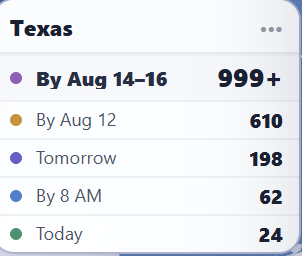
Read each delivery answer on its own
Drink Update was fulfilled by Amazon from The Colony, Texas. The same check returned a different amount for each delivery promise.
- Today24
- By 8 AM62
- Tomorrow198
- By Aug. 12610
- By Aug. 14–16999+
Do not add those numbers together. Read each row as a separate answer from Amazon. A later row does not mean every unit can arrive today.
What does each quantity actually tell you?
The number is the most Amazon let that shopper try to order for that product, seller, ZIP, and delivery time when HowMany checked.
It is not a count of every unit in an Amazon warehouse. It is not the seller's full stock. It is Amazon's answer for one shopper and one set of conditions at that moment.
The check reached 999 and stopped. The amount may be 999 or more, but Geo View cannot tell you how much more. It is not an exact stock total. See the Amazon 999 Trick guide for the full explanation.
Why must the seller stay the same?
One Amazon product page can have many sellers. Each seller can have a different price, order amount, shipper, and delivery time.
If the seller changes, it is no longer the same test. Geo View lets you pick the seller first and follow that seller across all eight ZIP checks.
What can seller comparison show?
Comparison mode keeps the first seller on the left and adds a second seller on the right. It also keeps any delivery row shown by either seller. A dash means that seller had no answer on that row.
Add a second seller without hiding the first
Northwest · destination ZIP 98101
Drink Update
30Seller limit · FBA · Kent, WA
Prime Peak Supply
420By Aug. 14 · FBA · Troutdale, OR
Amazon would not let that shopper add more than 30 from that seller during the check. The test stopped at 30 before it could find a higher amount. It does not mean the seller owns only 30 units.
This can help you study what shoppers see in different parts of the country. It may also help you look into a regional Buy Box change. But it does not prove why Amazon picked one seller.
Amazon says price, condition, shipping speed, and other details can appear with a Featured Offer. Amazon also says competitive pricing, delivery speed, and seller performance can matter.2 Geo View shows clues you can compare. It does not reveal Amazon's full decision.
What can Geo View show—and what can it not prove?
It can show
- What Amazon returned for eight saved ZIP checks
- Amazon's separate delivery-time answers
- The seller and who ships the order
- Where two sellers look different
- When a result stops at 999
It cannot prove
- Every unit Amazon or the seller owns
- Exact stock inside each warehouse
- What every Amazon shopper will see
- What Amazon will show tomorrow
- Why Amazon chose a Buy Box winner
What should you check first?
Look for clear differences, then check the details behind them.
Geo View checklist
- Make sure the product and seller are the same.
- Check who ships the order.
- Read each delivery row by itself.
- Look for a ZIP where fast delivery goes away.
- Look for a large gap between sellers.
- Treat 999 as a stop, not an exact total.
- Save the check time before comparing later.
Reviewed by John Lucero
John owns and runs HowMany. He reviewed the product wording, the delivery-row explanation, and the limits placed on every claim in this guide.
Sources
- Amazon Science, “How Amazon reworked its fulfillment network to meet customer demand,” July 24, 2023. This source supports Amazon's eight-region network and the reason shorter routes can improve speed. It does not validate Geo View's sample amounts.
- Amazon, “Maximize your sales potential with the Featured Offer,” April 10, 2026. This source explains what shoppers see with Featured Offers and the kinds of details Amazon uses to describe them.